

What Happens to Your Facebook Profile When You Die?
I wrote this post nearly a year ago, and as it's about to be the anniversary of my friend's death which prompted me to write it in the first place, it seems a timely reminder to share it again. It's not a nice topic, but it's so much worse if you don't address this now. I believe it’s better to prepare for the worst, when you are feeling at your best.
The thing is, ‘nothing happens’ to your facebook profile when you die, unless you prepare for that certainty or someone else will be left to take on this rather distressing task.
Let’s discuss the reality of what ‘nothing happens’ really looks like:
All in all, leaving your Facebook account running in the event of your death is not an optimal scenario and is something you should prepare for now in order to save your loved ones from having to handle this pain on top of their inevitable loss. Basically, think of it as a social media will.
Who Lets Facebook Know?
In the event of your death, anyone can inform Facebook of your passing using this form here. They will need to provide a death certificate (so it would most likely be a family member). Otherwise your account will continue and is open to abuse or causing distress that I mentioned above. Once Facebook is informed they will then act upon your wishes to either delete or memorialise your account and then notify your legacy contact. We’ll get into these details next.
Delete or Memorialize Your Account?
You need to decide what happens to your profile after you die. This is a tricky one. Your options are currently that your account will be deleted or memorialized.
Think carefully about ticking the delete option - remember your family may want to take some time to download your photos (if you have allowed this) and/or read posts from friends. It can be a very important part of grieving so please consider what you feel might be best for your loved ones.
Memorialization offers them the options to keep the page as a memorial for you, but will also allow them to request its deletion/removal eventually.
There is no right or wrong answer to these options, but perhaps it’s something you can discuss with your nominated legacy contact? Keep in mind that if you, the account holder, request to have your account permanently deleted, Facebook will remove your account once they are made aware you have passed away. All of your info, photos and posts will be permanently removed from Facebook and no one will be able to see your profile again.
To memorialize your account after you die, you need to nominate a legacy contact. The next section deals with this in detail.
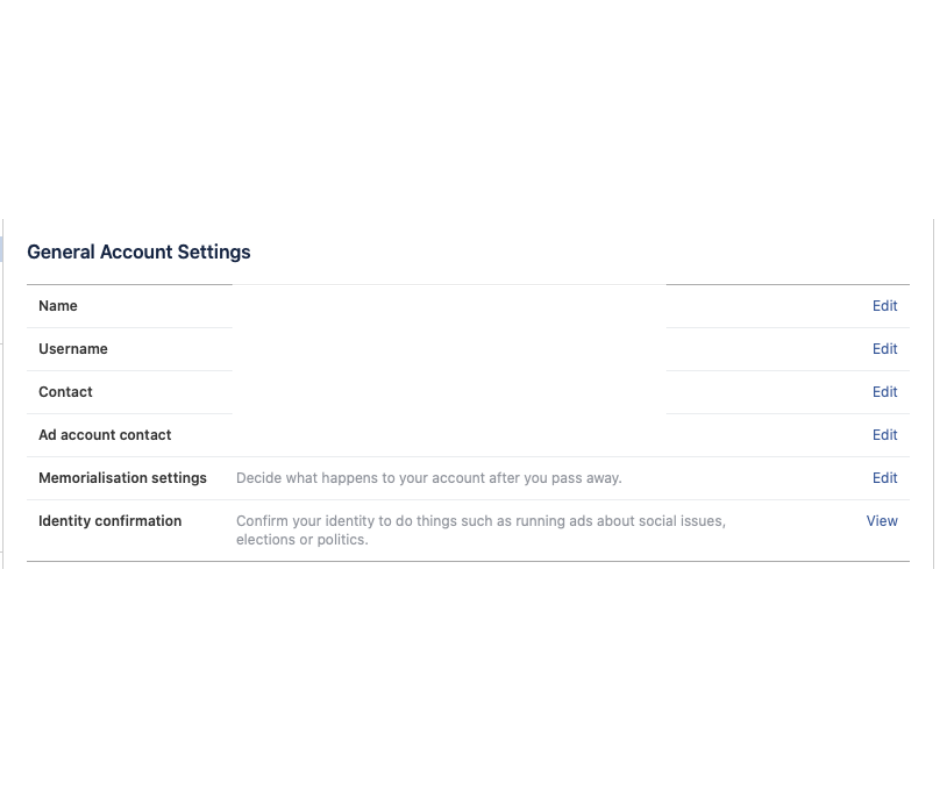
This is where you can access these settings:
- 1From the top right of Facebook, click the down arrow and select Settings.
- 2Click Manage Account.
- 3Go to "Memorialisation settings" - see first screen shot below.
- 4Nominate a legacy contact and/or choose to have your account deleted in the case of your death - see second screen shot below.

Memorialization & Nominating a Legacy Contact
A legacy contact is someone you choose to look after your account if it's memorialized after your death.
Memorialized accounts are a place for friends and family to gather and share memories after a person has passed away.
Memorialized accounts have the following key features:
Your legacy contact can:
Your legacy contact can't:
To add your legacy contact:
You can add, change or remove your legacy contact in your account's General Settings at any time.
To change or remove a legacy contact, follow steps 1–3 above, then click Remove. From there, you can add a new legacy contact if you'd like.
If your account is memorialized, your legacy contact will be notified (in the event they did not notify Facebook of your death).
Remember, anyone who has your death certificate can ask Facebook to memorialise your account, but if you as the account holder haven’t selected a legacy contact, the account won't be actively cared for by anyone after memorialization has been requested. So it’s really important to nominate your legacy contact.
Let’s spare our loved ones from this pain by preparing for this eventuality right now (yes, today!) - please open another browser window and follow the steps above.
Verified Family Members
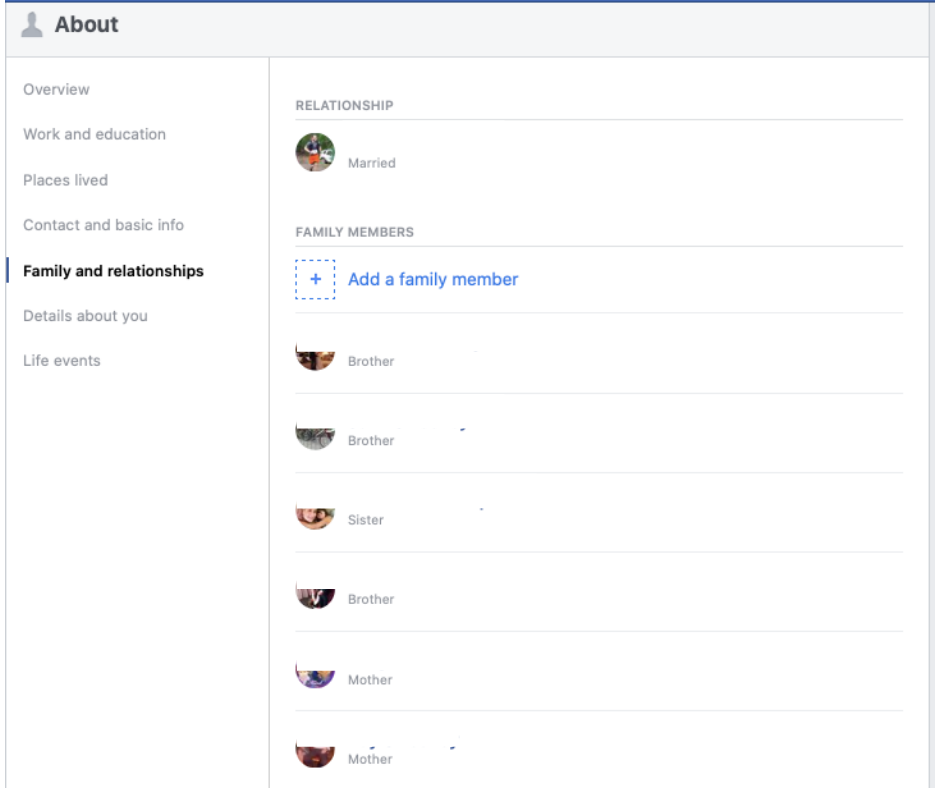
One additional step that is not essential but could be really helpful in the event of your death, is to have your family members added to your profile. This simply means you have verified them (they have to approve this request) as family and therefore it will be easier for them to communicate with Facebook about your profile after your death.
To add a family member to your About page:
When Someone Has Already Died
What if you are on the other side of the fence right now? Perhaps you have lost someone close to you and are left wondering what to do with their Facebook profile? It’s unlikely that they had already decided what would happen to their Facebook account in the event of their death - these options are quite new and still relatively unknown.
To remove your loved one's account from Facebook, you will need you to provide documentation to confirm you're an immediate family member or executor of the account holder. The fastest way for Facebook to process your request is for you to provide a scan or photo of your loved one's death certificate, which normally only family members will hold.
Once you have the required documentation, you need to send a request to Facebook to either memorialize or remove the account. Here is the link to do that: https://www.facebook.com/help/contact/228813257197480
I appreciate this wasn’t the most cheery subject to lead you into the weekend but please take a moment to take care of this, because it can spare your friends and family a world of misery in the case of your untimely death.